Adding a DMARC record with Amazon AWS/SES (Route 53)
- Sign in to your Amazon AWS Console.
- Go to Route 53.
- Go to Hosted Zones.
- Select your domain.
- Select Create Record.
- Enter/select the following details (leave everything else default):
- Record name:
_dmarc - Record type:
TXT - Value:
"v=DMARC1; p=none; rua=mailto:rua-import-xxxx@sendforensics.com"
[Notes: includes the speech marks, also replace rua-import-xxxx@sendforensics.com with your own unique SendForensics RUA processing address which can be found in Domain Settings for your domain.] - TTL:
60 (so that you do not need to wait too long before verifying)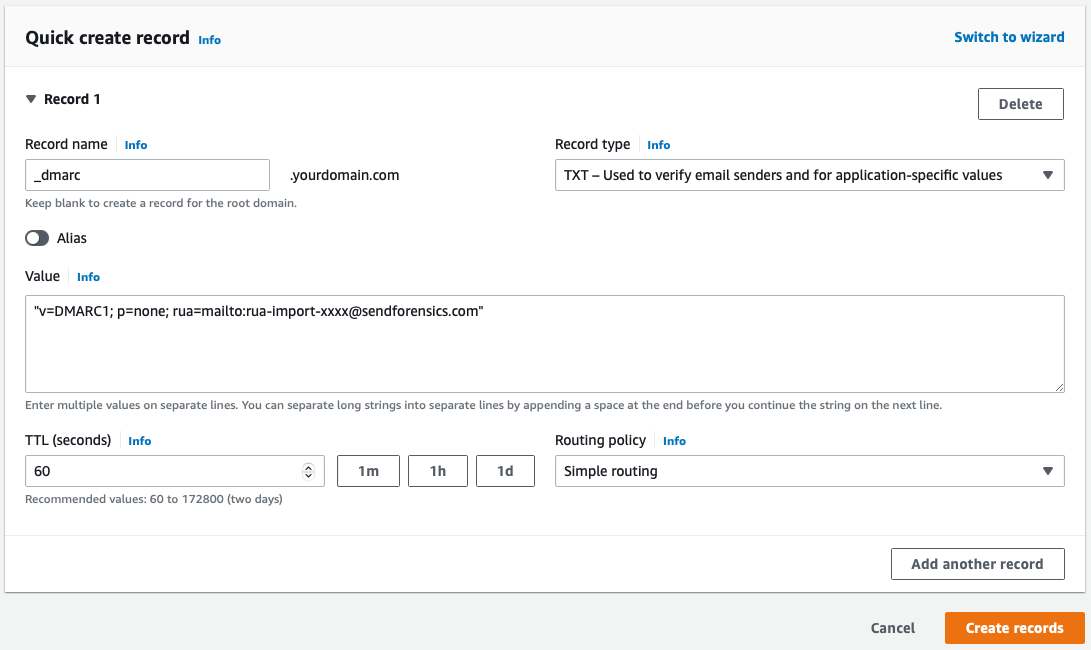
- Record name:
- Select Create Records to save your new TXT record.
- Wait for at least 60 seconds, then you can verify that you have the correct record entered in Domain Settings for your domain.