ESP Plan Only - Setting up Integrated Deliverability Testing
Contents
Implementation
Step 1. Configure the sending of emails for analysis
In order for SendForensics to perform an analysis of an email, the email needs to be sent to SendForensics via standard SMTP. This allows for a complete and thorough analysis of the email content and infrastructure.
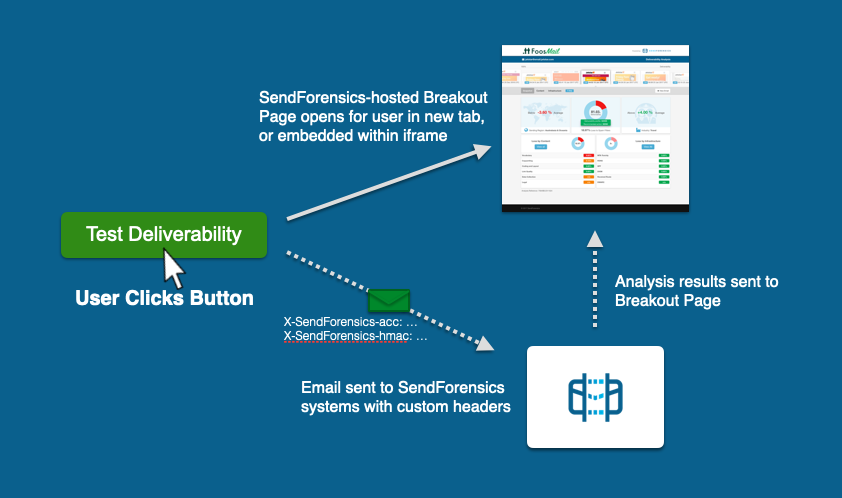
It is recommended that an ESP includes a "Deliverability Test/Spam Test" facility within their application during the user's final stages of composing their campaign. When this facility is activated, the ESP will send an email to a predesignated SendForensics email address. The email should be sent exactly as it would be to the user's subscriber base, except that it must contain two additional custom headers (with an optional third for a search key). These custom headers identify the email to SendForensics systems for retrieval after analysis:
X-SendForensics-acc: ACCID:account_id;EMID:email_id;ANALYSISID:analysis_id;TIME:nonce;MODE:mode;LISTSIZE:list_size;CUSTOMERID:customer_id;LANG:language_iso;COISO:country_iso;REGION:region_code;INDCODE:industry_code
X-SendForensics-hmac: hashed_string
X-SendForensics-searchkey: search_key
You need to generate an encrypted identification header via the Hash Message Authentication Code (HMAC) method, using your unique API account information which can be found at the bottom of this page.
Provided by SendForensics: |
|||||||||||||||||||||||||||||||||
|---|---|---|---|---|---|---|---|---|---|---|---|---|---|---|---|---|---|---|---|---|---|---|---|---|---|---|---|---|---|---|---|---|---|
| token | Token provided by SendForensics used to create a a keyed-hash message authentication code (HMAC) | ||||||||||||||||||||||||||||||||
| account_id | Account ID provided by SendForensics. | ||||||||||||||||||||||||||||||||
| password | Account password provided by SendForensics. | ||||||||||||||||||||||||||||||||
Provided by ESP (required): |
|||||||||||||||||||||||||||||||||
| nonce | The nonce value is a timestamp and must be provided in Unix epoch time format. | ||||||||||||||||||||||||||||||||
| email_id | ESP allocated identifier for the campaign / email being analysed. This identifier must be unique per campaign and must be either numeric or alpha-numeric. Eg: 20150125abc) | ||||||||||||||||||||||||||||||||
| analysis_id | ESP allocated identifier for the analysis being performed. This identifier must be unique per analysis and must be either numeric or alpha-numeric. ESP may choose to concatenate the email_id with an incrementing number series to create this unique analysis_id. Eg: 20150125abc001, 20150125abc002, etc.) | ||||||||||||||||||||||||||||||||
Provided by ESP (optional): |
|||||||||||||||||||||||||||||||||
| mode | This flag is used to denote if the analysis being performed is a LIVE or TEST analysis. The accepted values are live and test. This item is optional but is recommended. Default is live. | ||||||||||||||||||||||||||||||||
| list_size | The total number of recipients that the campaign is being sent to. Value must be specified as an integer. This item is optional but is recommended. | ||||||||||||||||||||||||||||||||
| customer_id | A unique alphanumeric identifier for each ESP's customer which will allow the ESP's customer to view all domains and email addresses allocated to them in the API. Max length 128 characters. | ||||||||||||||||||||||||||||||||
| language_iso | 2 letter ISO code of the primary language that the email is in. For example, if the primary language of an email is French, use the code FR. If the primary language is Spanish, use the code ES. | ||||||||||||||||||||||||||||||||
| country_iso | 2 letter ISO code of the primary country for the target-audience where available. For example, if the primary target audience of an email is in Singapore, use the code SG. If added, the system will automatically set the region. | ||||||||||||||||||||||||||||||||
| region_code | If there is no country-specific target-audience, you can instead specify the region directly from one of the following options:
|
||||||||||||||||||||||||||||||||
| industry_code | 4 letter industry code used to specify the type of Industry served by the particular sending domain. Valid options are:
|
||||||||||||||||||||||||||||||||
| search_key | Any alphanumeric string that will then be used to help you filter for certain groupings of emails within the Network Details page. See 'Result Filters' on the All Domains & IPs page for more details. | ||||||||||||||||||||||||||||||||
The HMAC is a cryptographic method used to verify that the originating email is authentic and that it originated from the correct provider. The SHA256 hash algorithm is employed to provide greater security.
To produce an HMAC signature, concatenate the account_id, password, email_id, analysis_id and nonce into a single string. You can then apply an HMAC hash function with the supplied token to produce the HMAC signature:
<?php
  $nonce = time();
  $string = $account_id . $password . $email_id . $analysis_id . $nonce;
  $hashed_string = hash_hmac('sha256', $string, $token);
?>
Actual values would look like:
<?php
$nonce = time();
$string = "ksTHnoAxhjss8ds.GH4a.H7201501231007201501231007T0021471875230";
$hashed_string = hash_hmac('sha256', $string, $token);
?>
So from those values, we can now we can set a custom header in our email:
X-SendForensics-acc: ACCID:ksTHnoAx;EMID:201501231007;ANALYSISID:201501231007T002;TIME:1471875230;MODE:live;LISTSIZE:50000;CUSTOMERID:853996;LANG:EN;COISO:FR;REGION:europe;INDCODE:FINS
X-SendForensics-hmac: 191d54ccfb64d8719f955357feaac5cef94e706f99916c55684cdf648e8561d7
The email sent to your unique email address provided by SendForensics for analysis needs to contain the custom headers. These will be used by SendForensics to authenticate the legitimacy of the email and prepare the analysis report for retrieval once complete. For account and security purposes, SendForensics will not process any emails that do not pass the HMAC validation step.
When a Deliverability Test is required, the email should be sent to your unique SendForensics EDC Analysis Address provided by us. This can be found on the account profile page.
Step 2. Create the link(s) to the Breakout page
There are a number of options for linking to the Breakout page, depending on your requirements:
One link per analysis
This link can be created to bring a customer directly to a specific analysis.
Use the HMAC string calculated for the 'Send' API process as the identifier in the link. The link should have the following format, where YOURESPNAME is provided by us in your welcome email:
https://www.sendforensics.com/partners/YOURESPNAME/processing/?r=191d54ccfb64d8719f955357feaac5cef94e706f99916c55684cdf648e8561d7
This link can be used, for example, on a "Test Deliverability" (or similar) button/link within your UI to take the user to the analysis results for that specific email (as per the demo above).
If the CUSTOMERID variable is present in the header (supplying the specific customer to which the analysis belongs to), that customer will also be able to browse within the Breakout page to any of his/her analyses on any sending-domain or sending-address allocated to them.
One link per customer
This is a single link that can be used and re-used to always bring a customer to their most-recent analysis, independent of sending-domain or sending-address.
A full link in this example would look like:
https://www.sendforensics.com/partners/YOURESPNAME/processing/?hash=b12120d59f7e9d7070475d734a2999d56efbfd2a5cd94565ed550f4849bafb45&cid=1018A3&email=username11%40somedomain.com&domain=somedomain.com
These are the options:
-
hash (required) : hash to validate link. Explanation on how to create is provided below.
-
cid (required) : alphanumeric customer_id to be provided by the ESP (see the 'Send' instructions above)
-
email (optional) : sending address that the ESP would like to open up on when linking to SendForensics. This overrides the domain option below. Must be a URL encoded value.
-
domain (optional) : domain that the ESP would like to open up on when linking to SendForensics.
The hash is calculated as follows (php example):
$account_id = 'ksTHnoAx'; (The account ID as provided)
$password = 'hjss8ds.GH4a.H7'; (The api password as provided)
$token = 'e0e2111724a95b5cc6b62e558f37d5a8e905eeac'; (The token as provided)
$customer_id = '8703'; (Your own unique customer ID added to the custom headers in the SEND part of the API)
$string = $account_id . $password . $customer_id
//sample string: ksTHnoAxhjss8ds.GH4a.H78703
$hashed_string = hash_hmac('sha256', $string, $token);
Customisation
The Breakout Page can be customised both by features made available, and by look and feel:
Features
The Features tab above allows you to select the features presented to your customers.
Look and Feel
There are multiple options for whitelabelling/customisation - please refer to the Look and Feel tab for details.